
From revenue to bank deposit, every dollar explained.
ClearDeposits reconciles Stripe to your bank statement and shows the revenue, fees, refunds and disputes behind every payout.
A Stripe subledger that reconciles every payout to your bank statement.
First two months free, then starting at $49/month. No card to start. US only.
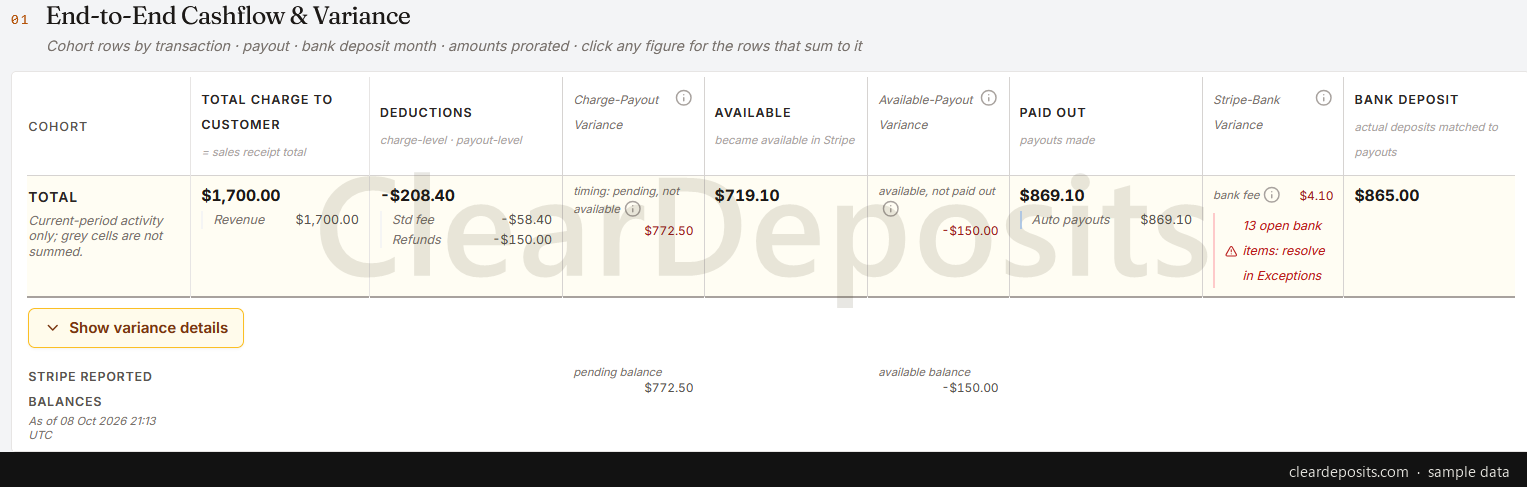
The problem
Stripe pays out a net figure. Your books need the whole story.
The bank shows one line. "STRIPE TRANSFER, $1,439.40", with nothing to say which sales, refunds and fees it nets.
The detail lives in exports. Balance activity, payouts, invoices: separate files and formats, stitched together by hand each month.
Stripe's 1099-K won't match Stripe's payout reports. The form is gross and dated by when funds became available; payouts are net and dated when they left.
A gap you can't see, you can't fix. An unexplained difference becomes a plug entry, and the plug becomes next month's mystery.
What it does
Confirm the books. Don't construct them.
Every deposit, opened up
Bank deposit to payout to the customer charges behind it, with the revenue, fees, refunds and disputes that make up each.
Variances named, not netted
Timing differences and known discrepancies are called by name: fees, refunds, chargebacks, timing, open items.
Payouts matched to deposits
Each payout is paired with the deposit that reached the bank, to the cent by default or within a tolerance you set.
Stripe in, read and reports only
A restricted key that reads and generates reports, nothing else. Or Stripe and bank CSV exports. Both enter through the same checks.
Review and adjust
Change an account or a match and the draft plan redrafts. Resolve a variance with an entry you choose, with every change on the audit trail.
Post and close
A posting plan tied out to your Stripe balance. At month end, one summarised accounting CSV, laid out by account and QuickBooks Online activity, for you to import into QuickBooks Online. Posting straight into QuickBooks Online is work in progress.
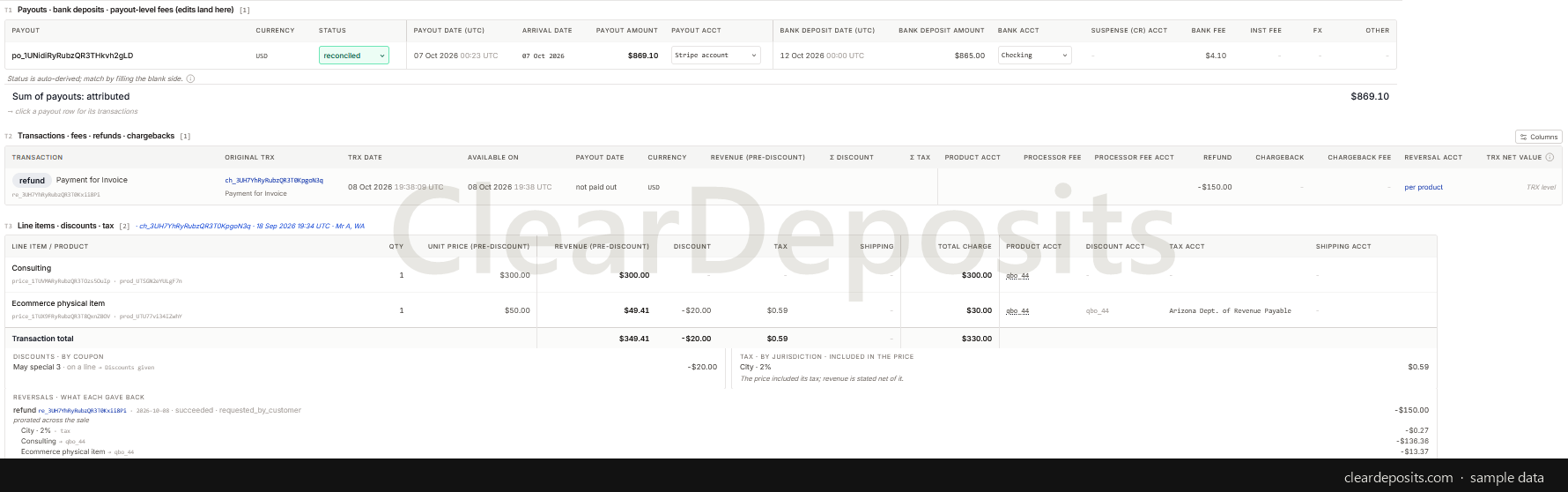
Drill down
Every amount is clickable.
Click any figure for the rows that sum to it: payouts, then transactions, then line items, with discounts, tax and what each refund gave back.
Mapping
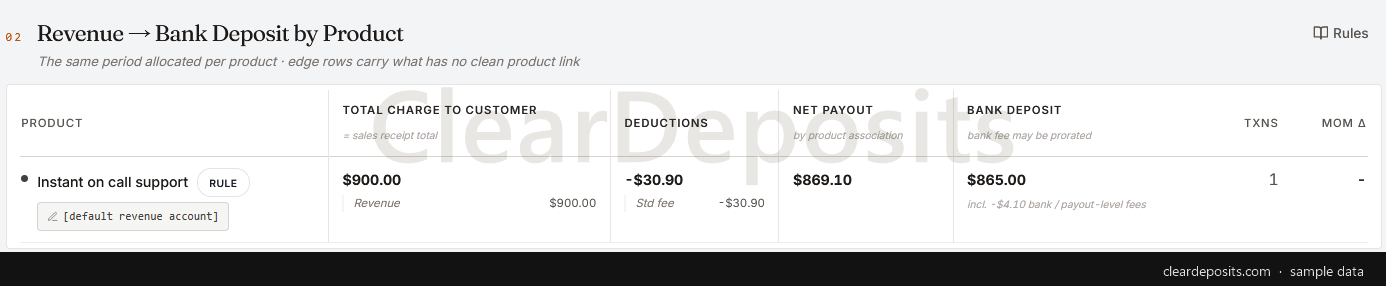
Revenue by product, and the account each lands in.
The same period allocated per product. Assign a product and account, or reclassify, from the row itself. The draft plan redrafts, with the change recorded.
The output
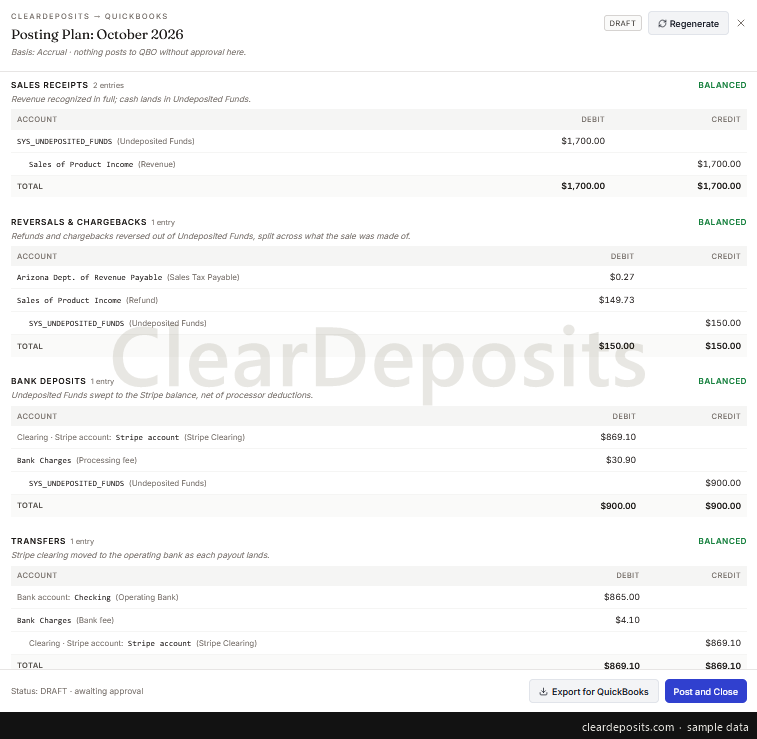
See the posting plan before anything is imported.
Balanced entries by category, each line naming its account. You export the plan as a CSV and import it into QuickBooks Online yourself.
Built to earn trust
Rehearse the close. Keep what you sign off.
Sync tools post, then you audit QuickBooks Online. With ClearDeposits you audit, then sync.
You choose the accounts and approve the plan.
Change an account or a match, and the draft plan redrafts with every change recorded.
An open month is a staging ground.
Import, reconcile, discard an upload and re-import it, or start the whole month over. Nothing is posted until you post and close.
Reconcile during the month, not only at the end.
With a read-only key, Stripe data is pulled daily and the draft plan is always available.
Resolve a variance with an entry, not a plug.
Record an adjustment with the account, side and date you choose, and it appears in the plan.
Two proofs before you close: the activity and the balance.
Charges less deductions tie to each payout, and the rolled-forward Stripe balance is compared with Stripe's reported balance.
Manual payouts are tied to the charges they paid out.
Each manual payout is associated with its charges when the amounts tie exactly, and otherwise shown as Stripe reported it.
Closed means closed.
Once a month is closed, nothing in it can be edited or deleted. A correction is a new entry in the current period.
The rest of the record.
Nothing is counted twice: every transaction is keyed by its Stripe id. Settings change from a date you choose, after a preview. Every change is on the trail with who, when and what it was before. Each client is its own workspace under one login.
Who it is for
Accountants, bookkeepers, fractional CFOs and owners keeping QuickBooks Online books for a business that charges through Stripe, subscriptions included. Revenue recognition timing on the basis you choose: accrual, cash in the bank, or Stripe 1099-K (available-on date; timing only). Not yet for invoices on net terms, accounts receivable or deferred revenue, and not yet for anyone who needs direct posting.
What ClearDeposits does not do yet
It works with Stripe only. Posting straight into QuickBooks Online, and bank feeds, are work in progress. It is available in the US only. It has not yet completed a SOC 2 audit. What is coming →
Close the month on numbers you can explain.
From $49 per month.First two months free, then starting at $49/month.
From the founder
Why I built ClearDeposits
I spent 12 years in finance systems, most recently at Amazon, leading payments and reconciliation products that moved hundreds of billions of dollars across millions of transactions.
Accountants and small businesses are stuck between two bad options: context-less matching tools that add reconciliation and context-switching overhead, and enterprise suites that know nothing about a standard business until months of configuration. ClearDeposits is the system in between: it knows just enough accounting and business context to be running in a few minutes and to put every variance in front of you, so you close earlier.
Ammar Haleem, founder · The full note →